


Managing admissions documents is a routine part of student recruitment, but it can quickly become an operational challenge when schools are processing applications across multiple programs, intakes, and recruitment channels.
Transcripts, identification documents, language test results, financial records, and signed agreements may arrive through online application forms, email, education agents, or direct staff uploads. Without a consistent process for organizing and reviewing these submissions, admissions teams can struggle to maintain an accurate picture of each applicant’s progress.
The consequences extend beyond administrative inconvenience.
Missing documents can delay application reviews. Unclear requirements generate repeated communication. Files awaiting approval may be mistaken for completed requirements, while admissions staff spend valuable time tracking down information instead of supporting prospective students.
For language schools and career colleges operating with lean admissions teams, these inefficiencies can become particularly costly during peak recruitment periods.
Effective document management for schools requires more than centralized file storage. Institutions need a coordinated workflow that connects document requirements, submissions, review statuses, correction requests, and staff responsibilities.
By establishing clear processes and using appropriate admissions management software, schools can reduce manual follow-up, improve visibility into incomplete applications, and help qualified applicants progress through the admissions process more efficiently.
Keep admissions moving.
Organize documents. Coordinate follow-up.

What Does Admissions Document Management Need to Track?
A school document management system should do more than collect and store PDFs. It should help admissions teams understand where each required document stands and what must happen next.
This begins with establishing consistent document statuses.
| Document Status | What It Means | Required Action |
|---|---|---|
| Requested | The applicant must provide a document that has not yet been received. | Applicant or agent submits the file. |
| Received | A document has been submitted and associated with the applicant. | Confirm receipt and prepare for review. |
| Awaiting Review | The document is ready for assessment by an authorized staff member. | Review its accuracy, completeness, and suitability. |
| Correction Needed | The submitted document does not meet the stated requirements. | Request a corrected or replacement file. |
| Complete | The document requirement has been satisfied according to institutional rules. | Continue the application process. |
These are recommended workflow states. Individual institutions and software platforms may use different labels.
Why Do Document Statuses Matter?
Consider an applicant who uploads a passport scan. The file has arrived, but admissions has not yet confirmed whether the scan is legible, valid, or associated with the correct applicant. Marking the requirement Complete immediately could create an inaccurate application record.
A defined workflow instead allows the file to progress through receipt, review, and acceptance. This distinction also improves operational reporting. Admissions managers can identify whether incomplete applications are waiting on students, agents, or internal reviewers.
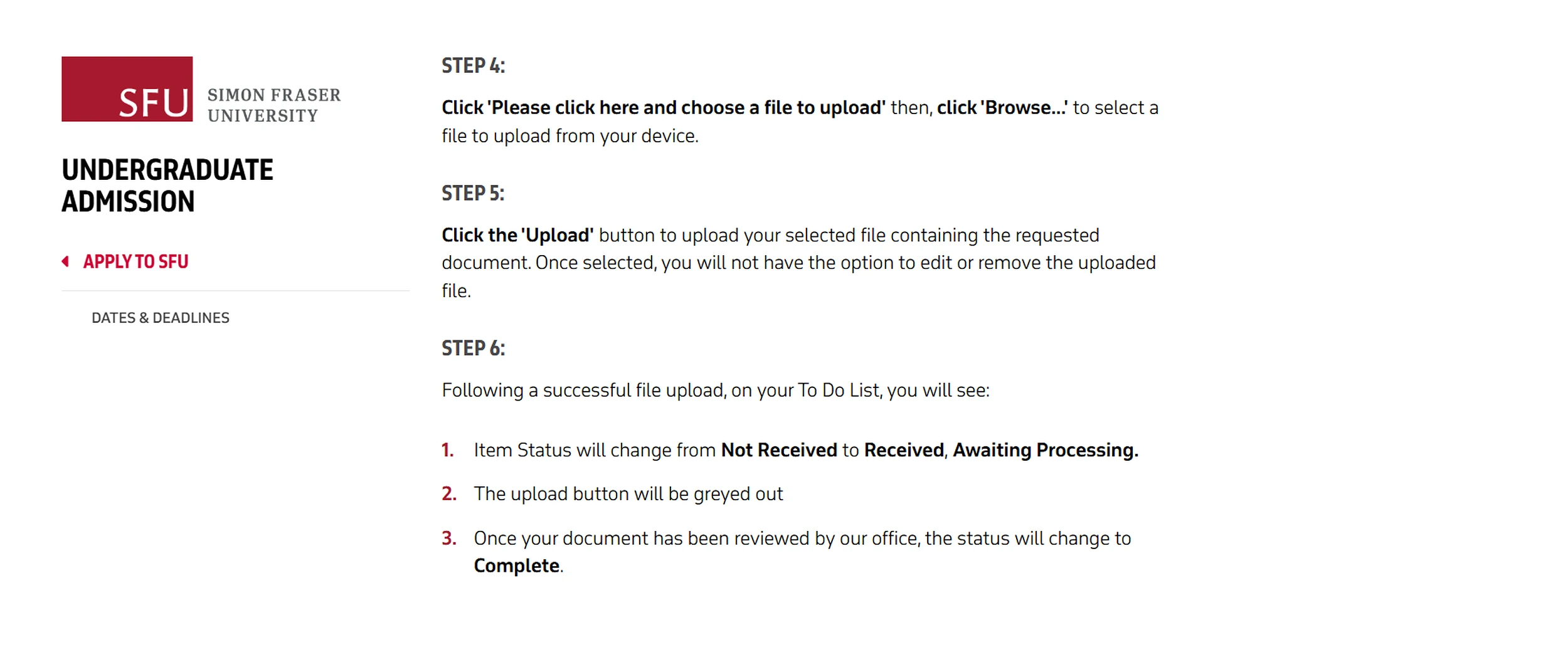
Simon Fraser University demonstrates why document receipt and completion should be separate statuses. After an applicant uploads a requested file, SFU changes the item from “Not Received” to “Received, Awaiting Processing”; only after Admissions reviews the document does it become “Complete.” If the file contains an error or is missing information, the university can reopen the requirement so the applicant can submit a replacement.
For smaller institutions, the objective is not to introduce unnecessary administrative complexity. It is to ensure everyone interprets document statuses consistently.
How Should Schools Build Applicant-Specific Document Checklists?
One of the most common weaknesses in admissions document management is relying on a universal checklist for every applicant.
Requirements often vary according to the student’s circumstances.
For example, a short-term language student may need identification and enrollment information, while a career-college healthcare applicant may require academic transcripts, prerequisite evidence, and additional program-specific documentation.
Schools should consider several factors when determining requirements:
- Program and credential: Different academic pathways may have distinct prerequisites.
- Applicant background: Previous education and language proficiency can affect required evidence.
- Domestic or international status: Documentation requirements may differ.
- Campus and intake: Location-specific rules and deadlines may apply.
- Application stage: Some documents are required before assessment, while others become necessary after an offer.
- Institutional or regulatory requirements: Particular programs may require additional verification.
How Can Schools Make Checklists More Useful?
Each checklist item should communicate more than the document name.
For example, a transcript requirement should specify whether the school accepts an uploaded copy initially, requires an official version later, or needs documentation covering a particular academic period.
The checklist should also identify the submission deadline, acceptable format, and review responsibility.
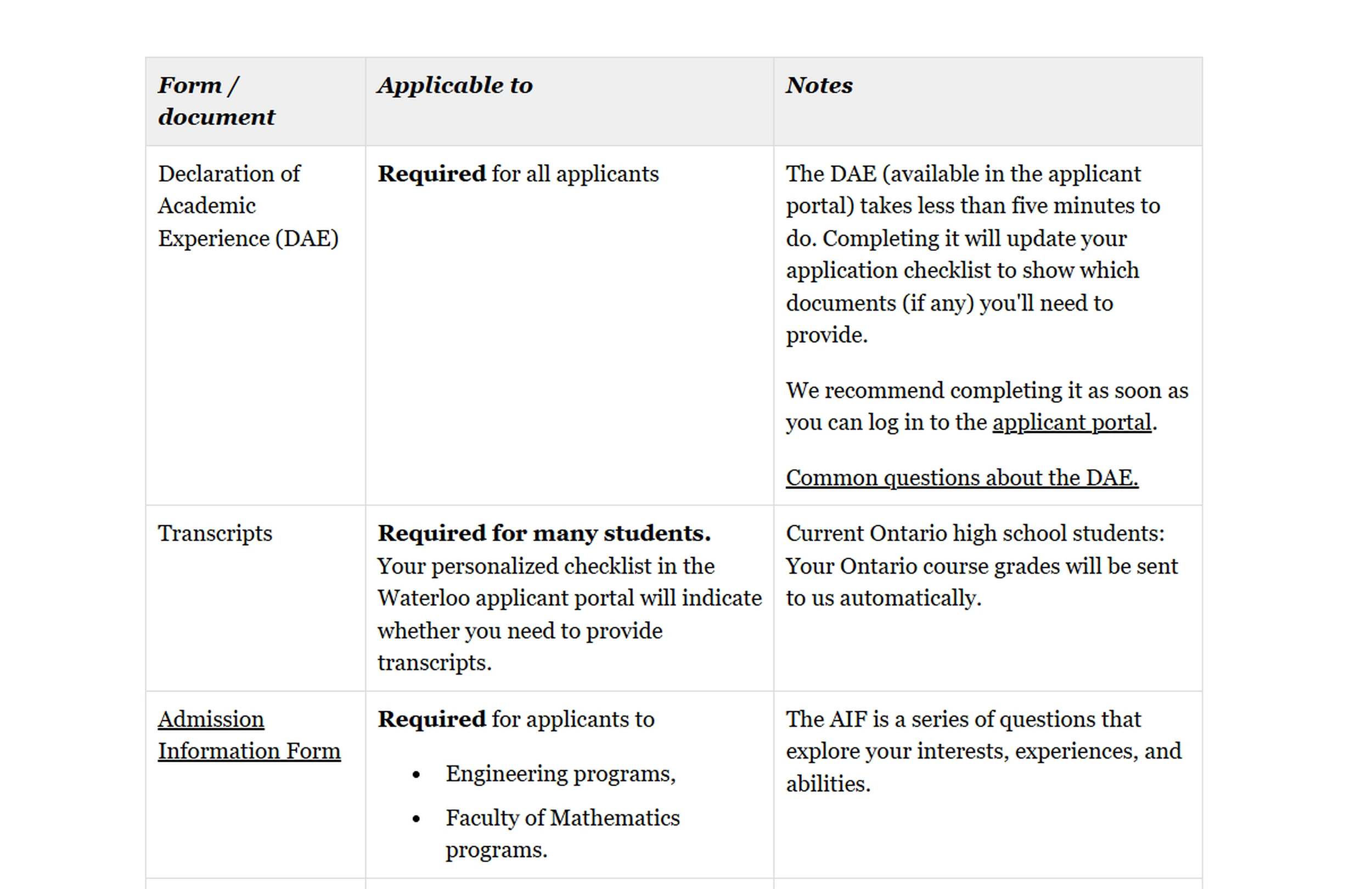
The University of Waterloo uses applicant information to tailor document requirements. Applicants complete a Declaration of Academic Experience in the Waterloo applicant portal, which updates their checklist to show the documents they need to provide; transcript requirements also appear on a personalized checklist. This illustrates how document requests can reflect an applicant’s actual educational background instead of relying on one universal list.
The operational lesson is straightforward: requirements should reflect the applicant’s actual situation rather than a generic collection of possible documents.
This approach reduces unnecessary submissions, simplifies review, and limits the personal information schools collect without a clear purpose.
Why Should Schools Separate Document Receipt From Approval?
One of the most important improvements schools can make is distinguishing between receiving a document and approving it. These actions represent different stages of the admissions process.
Suppose an applicant uploads an academic transcript. The file may be successfully received, but admissions still needs to confirm that it meets the institution’s requirements.
Reviewers may need to check:
- Whether every required page is present and readable.
- Whether the document belongs to the correct applicant.
- Whether names, dates, and academic information are consistent.
- Whether the correct document type was submitted.
- Whether an official version or further verification is necessary.
A file should only be marked Complete once the relevant checks have been satisfied.
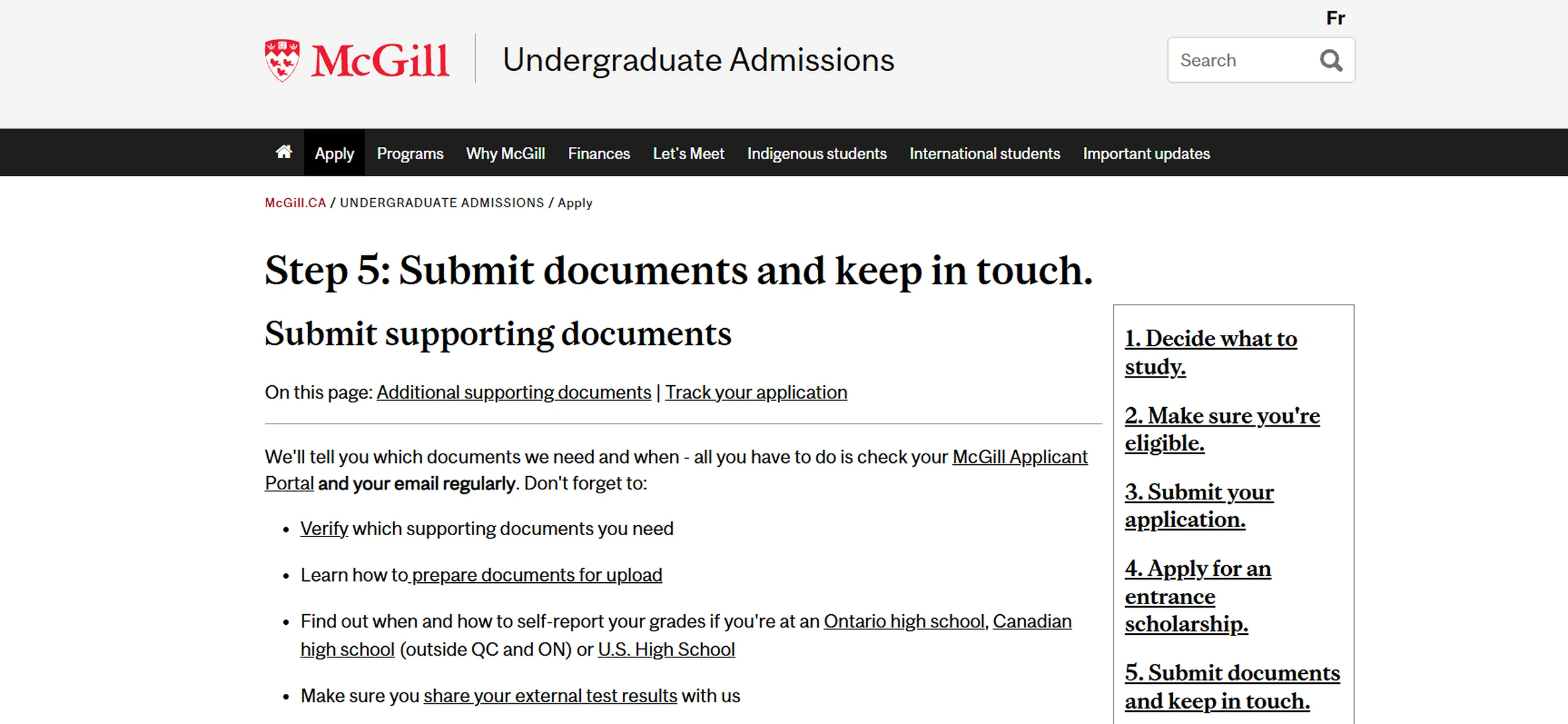
McGill University separates document receipt from the broader completion of an application file. Applicants can see when a document has been received in the Applicant Portal, while admissions officers may subsequently request additional or updated material if further evidence is needed. A received file may therefore still require further action before the application is complete.
Why Is This Distinction Operationally Important?
When schools treat uploaded documents as automatically accepted, incomplete applications may appear ready for assessment. Problems can then emerge later, potentially delaying offers, enrollment confirmations, or other time-sensitive steps.
The McGill Faculty of Law’s supporting-document guidance demonstrates why applicants must monitor document requirements and respond when submissions need correction. See also the Faculty’s application-process guidance, which explicitly asks applicants to check for missing, incomplete, or illegible documents.
Admissions teams should consistently distinguish three questions:
- Received: Has the document arrived?
- Reviewed: Has an authorized person assessed it?
- Complete: Has the requirement been satisfied?
Document completion also remains separate from an admissions decision. A student can provide all required materials without necessarily meeting the institution’s admission criteria.
Who Owns the Next Action on a Missing Document?
Document delays frequently occur because the next action is unclear. An applicant may believe everything has been submitted, while admissions is waiting for a replacement file. An advisor may assume another department is reviewing a document that has not yet been assigned.
A structured workflow should identify six essential details for every outstanding requirement:
- Document type
- Application stage
- Current status
- Next required action
- Responsible person
- Due date
Consider this illustrative example:
| Document | Stage | Status | Next Action | Owner |
|---|---|---|---|---|
| Passport | Application | Complete | None | Admissions |
| Transcript | Application | Correction Needed | Request clearer scan | Advisor |
| English test | Application | Requested | Submit evidence | Applicant |
| Financial evidence | Pre-enrollment | Awaiting Review | Verify requirements | Senior Admissions |
| Signed agreement | Offer | Received | Review signature | Operations |
Each outstanding item should also have a deadline recorded in the system.
Distinguish Action Ownership From Follow-Up Responsibility
The person responsible for completing an action may not be the person responsible for monitoring it.
For example, an applicant must submit a missing transcript, but an admissions advisor may remain responsible for following up before the deadline.
Similarly, a finance specialist may need to verify financial documentation while the admissions manager monitors overall application progression.
Making these responsibilities explicit helps prevent applications from remaining indefinitely in a general Incomplete status. It also gives admissions managers a clearer view of workload distribution and outstanding tasks.
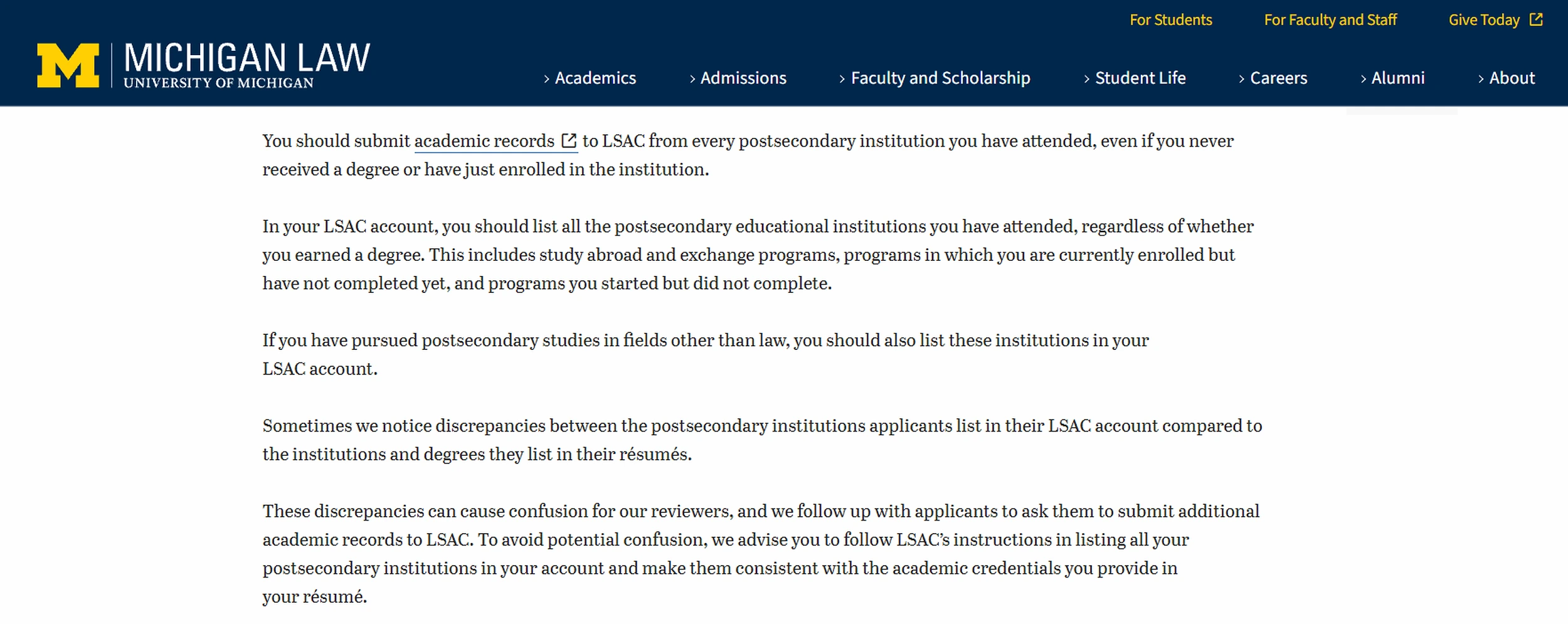
The University of Michigan Law School provides a practical example of structured missing-document follow-up. For its LLM program, applicants are contacted if the required CAS Report has not arrived within two weeks, and a subsequent status message identifies whether the application is complete or which materials remain outstanding. This gives the applicant a defined next action instead of leaving the file in an unexplained incomplete state. The same guidance explains that discrepancies in academic records can lead reviewers to request additional documents, as shown below.
How Should Admissions Teams Handle Corrections and Replacement Documents?
Not every submitted document will meet the school’s requirements on the first attempt. Common problems include unreadable scans, missing pages, expired identification, incorrect document types, and incomplete forms.
A useful correction workflow should preserve the history of the submission rather than treating the document as though it never arrived.
The process might follow these steps:
- Admissions receives and reviews the original document.
- The reviewer identifies a specific problem.
- The requirement changes to Correction Needed.
- The correction reason is recorded.
- The applicant or agent receives instructions and a deadline.
- A replacement is submitted for review.
- The requirement becomes Complete once the replacement is accepted.
Make Correction Requests Specific
Consider the difference between these messages.
Unclear: "Please resend your transcript."
Specific: "Please upload a complete copy of your transcript. Page two was missing from the version received on November 3."
The second request tells the applicant exactly what needs correcting. This reduces unnecessary exchanges and helps admissions teams resolve documentation problems more efficiently.
What Happens to Previous Document Versions?
Schools should also establish rules for replacement files. Staff need to know which version is current, when it was submitted, whether earlier versions must be retained, and who can approve the replacement.
UBC Graduate Studies provides a useful example of document version control. Applicants cannot remove an uploaded file; before the relevant deadline, they may submit an updated version, but it does not overwrite the earlier document and must be given a different name. This preserves a clearer record of what was submitted and when replacements were added.

These rules are especially important when multiple staff members or agents interact with the same applicant record. Document access, retention, and deletion should follow applicable privacy requirements and institutional records-management policies.
How Can Applicants and Agents Keep Document Submissions Organized?
Applicants should not have to repeatedly contact admissions to discover whether their documents have arrived. A well-organized submission process gives students visibility into what they need to provide and what has already been received.
An applicant-facing checklist should ideally show:
- Required documents and submission instructions
- Received documents
- Outstanding requirements
- Correction requests
- Relevant deadlines
- The appropriate submission channel
For example, if a student uploads a transcript but admissions identifies an unreadable page, the applicant should receive a clear correction request rather than a generic message that the application remains incomplete.
Why Do Agent Workflows Need Particular Attention?
Education agents often manage applications for multiple students simultaneously. Without a coordinated system, an agent may submit documents through email, receive updates from different advisors, and maintain a separate spreadsheet to track progress.
This creates opportunities for duplicated communication and inconsistent records. An agent-facing workflow can help recruiters identify outstanding requirements, submit supporting files, and monitor application progress for students they are authorized to represent.
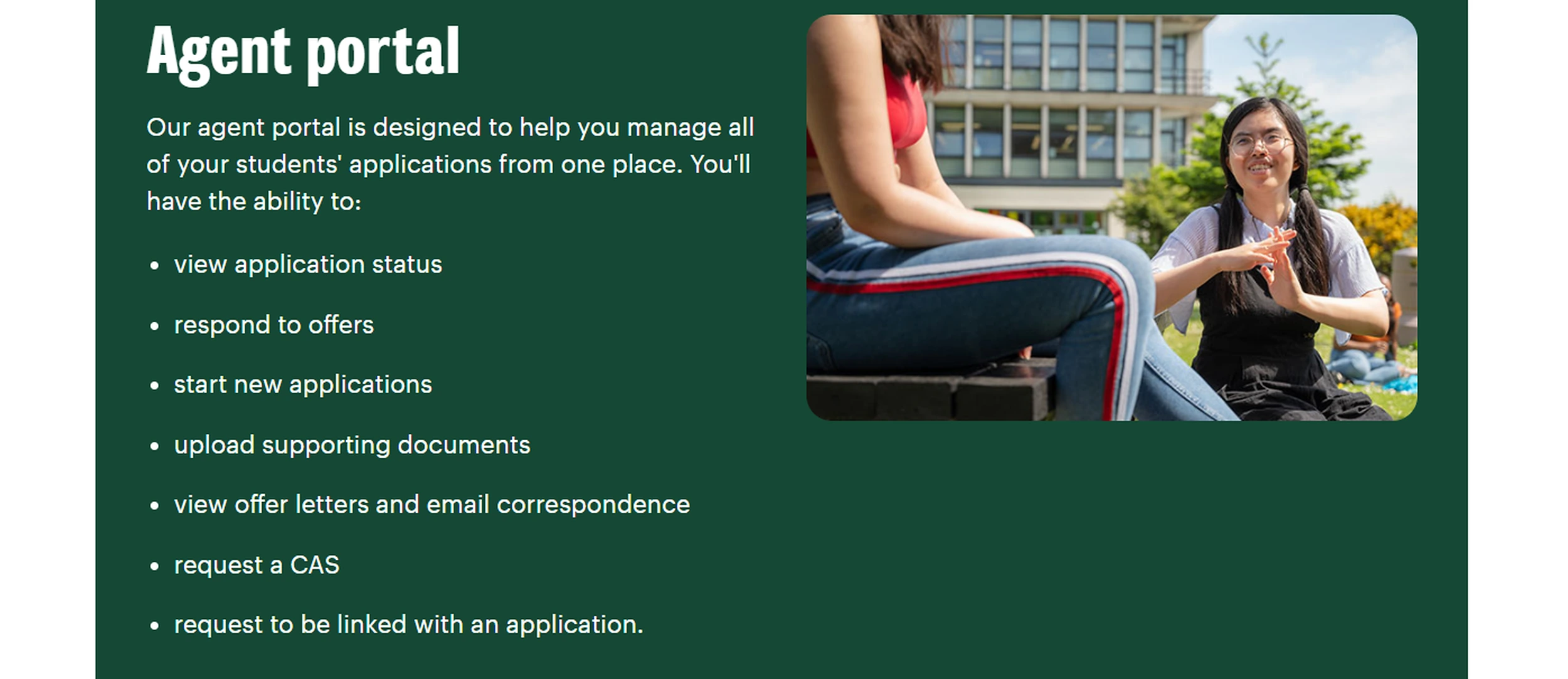
The University of York uses a dedicated agent portal to centralize recruitment-partner activity. Authorized agents can manage applications, upload supporting documents, view application status, access correspondence and offer letters, and request linkage to an applicant. This gives agencies a structured workspace for document and application activity instead of relying entirely on separate email threads and local tracking files.
HEM-SP’s Recruiters Hub supports agent-related application activity through a dedicated workspace. Explore the Recruiters Hub.
However, applicant and agent visibility should be governed by appropriate permissions. Access to submitted documents does not necessarily require access to confidential internal assessments. The objective is to provide enough information for the next action to be completed without exposing unnecessary student data.
How Can Schools Reduce Manual Document Chasing?
Admissions teams often spend considerable time identifying which applications need attention. Staff may open individual records, check email threads, review document folders, and contact colleagues simply to determine whether a file has arrived.
A status-driven workflow reduces this administrative burden by organizing work around outstanding actions.
Use Work Queues Instead of Checking Every Application
Rather than reviewing applications individually, teams can work from targeted lists such as:
- Documents awaiting review: Files requiring staff assessment.
- Corrections outstanding: Applicants who need to provide replacements.
- Requirements due soon: Documents approaching submission deadlines.
- Nearly complete applications: Applicants with only one outstanding requirement.
- Overdue tasks: Follow-up activities requiring escalation.
These views help staff prioritize work based on application needs and deadlines.
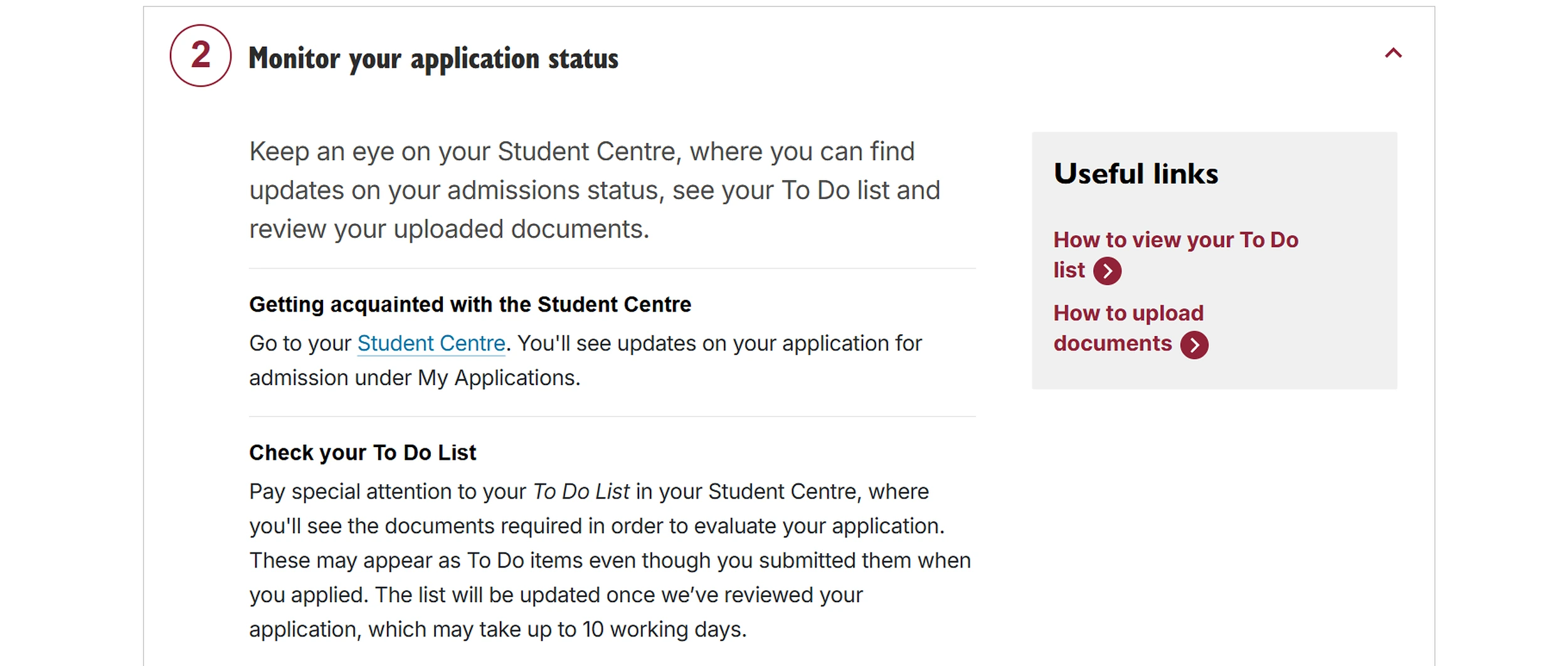
Concordia University shows how status-driven task lists can make outstanding requirements more visible. Its Student Centre includes a To Do List for documents still required, a separate List of Documents Received, and new admissions requests that appear as To Do items and are also communicated by email. This helps applicants focus on outstanding actions rather than repeatedly checking whether individual files were submitted. Concordia also notes that uploaded documents may remain on the To Do List until the application has been reviewed, so applicants should check the received-documents list before submitting duplicates.
Where Can Automation Help?
When supported by the institution’s admissions management software, assigned tasks and notifications can help coordinate routine follow-up.
For example, a document correction may create a task for an advisor to contact the applicant. A deadline-based reminder could prompt staff to review an outstanding requirement.
However, these capabilities depend on the system’s configuration and should not be confused with automated document approval.
Human reviewers remain responsible for determining whether submitted evidence satisfies institutional requirements.
Measure Where Delays Occur
Schools can also monitor practical workflow indicators:
- Average time between document receipt and review
- Number of correction requests per application
- Outstanding requirements approaching deadlines
- Applications delayed by missing documentation
- Staff workload associated with document review
These measures help managers distinguish between delays caused by applicants and bottlenecks within the admissions team.
What Does the Workflow Look Like for One Applicant?
Consider Maya, a hypothetical international applicant applying to a career-college healthcare program.
Her initial requirements include a passport, secondary-school transcript, and English-language evidence. A signed enrollment agreement will be required later.
Day 1: Application Submitted
Maya completes her application and uploads her passport.
Her checklist shows:
- Passport: Received
- Transcript: Requested
- English evidence: Requested
The admissions advisor can immediately identify the outstanding documents.
Day 3: Additional Documents Arrive
Maya uploads her transcript.
The passport has moved to Awaiting Review, while the transcript is marked Received.
The English-language requirement remains outstanding.
Day 4: Admissions Reviews the Files
The reviewer confirms that Maya’s passport meets the applicable requirements.
However, the transcript is missing a page.
The statuses become:
- Passport: Complete
- Transcript: Correction Needed
- English evidence: Requested
Maya receives a specific correction request with a submission deadline.
Day 6: Replacement Submitted
Maya uploads a complete transcript and provides her English-language evidence.
Both files move into the review process.
The admissions team can distinguish between documents awaiting assessment and those still requiring applicant action.
Day 7: Documentation Completed
After review, all three requirements are marked Complete.
Maya’s application can now progress to the next appropriate admissions stage.
This example demonstrates the value of a coordinated workflow.
Staff can identify what is missing, explain corrections, assign responsibility, and confirm when documentation requirements have been satisfied.
The workflow manages document readiness. It does not automatically determine admission eligibility or make an acceptance decision.
How Can HEM-SP Support an Admissions Document Workflow?
HEM-SP brings several relevant admissions functions into the applicant record, helping schools manage document collection alongside communications and follow-up activities.
Rather than maintaining disconnected folders, spreadsheets, and email threads, schools can use connected applicant information to support a more organized process.
Centralized Student Files
HEM-SP’s student document uploads and file management functionality supports the collection and organization of applicant documents. Its Student Profile includes a Files tab where staff can access documents associated with the student. Additional files can also be added to the applicant profile when necessary. See the Student Profile Files tab.
Keeping documents connected to the applicant supports more consistent student records management and reduces reliance on separate storage locations.
Customizable Online Application Forms
HEM-SP’s online application forms for schools support file-upload fields, conditional form logic, and save-and-resume functionality. These capabilities can help institutions collect appropriate information at different stages of the application process.
For example, conditional questions can help schools tailor form requirements to relevant applicant circumstances. The exact checklist and document-status configuration should be confirmed during implementation.
Staff Tasks and Follow-Up
HEM-SP’s task management functionality allows staff to organize activities connected to applicant records.
Tasks can include responsible users, due dates, priorities, and progress statuses.
Admissions teams can use these capabilities to coordinate activities such as contacting applicants about outstanding requirements or assigning staff follow-up.
Agent Application Management
HEM-SP’s Recruiters Hub provides a dedicated workspace for education agents to manage student-related application activity. This can help institutions coordinate agent submissions and application progress within a more structured recruitment process. Explore the Recruiters Hub.
What Should Schools Review Before Changing Their Document Process?
Before introducing a new system or revising an existing workflow, schools should assess how documents currently move through admissions. A practical audit should examine six areas.
1. Document Requirements
Are checklists tailored to individual programs and applicant circumstances? Are requirements clearly defined at each application stage?
2. Submission Channels
Where do documents arrive? Can applicants, agents, and staff submit files through approved channels without creating disconnected records?
3. Receipt and Review
Does the institution distinguish between receiving a file and accepting it? Are review criteria consistent across staff members?
4. Corrections and Replacements
Can reviewers record why a document is unsuitable? Are applicants given clear instructions? Can staff identify the current version?
5. Ownership and Deadlines
Does every outstanding requirement have a responsible person, next action, and deadline? Is there a clear escalation process for overdue items?
6. Visibility and Completion
Can admissions managers identify incomplete applications quickly? Do applicants and authorized agents understand what remains outstanding? Is Complete consistently defined?
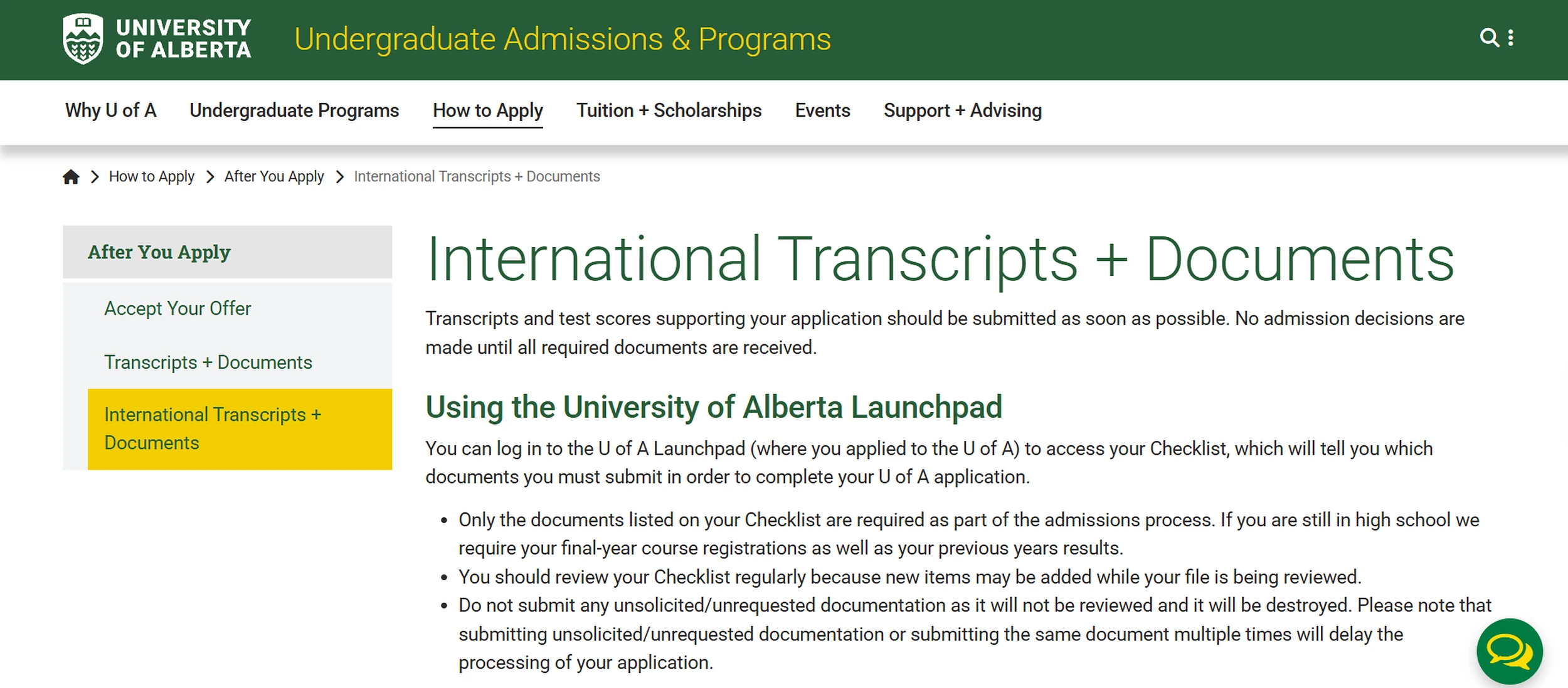
The University of Alberta’s Launchpad process illustrates why document requirements and submission channels should be reviewed together. Applicants are instructed to submit only the documents shown on their checklist, which may gain new items while the file is being reviewed, and the university warns that duplicate or unsolicited submissions can delay processing. Clear requirements therefore help reduce both missing documents and unnecessary document traffic.
Turn Audit Findings Into Process Improvements
Once gaps are identified, prioritize changes according to their operational impact. For example, if most delays involve replacement transcripts, improving correction messages and version handling may be more valuable than introducing additional reminder emails.
If files routinely arrive through personal inboxes, establishing an approved submission channel may be the first priority. Schools should also document the revised workflow, train relevant staff, and test it using realistic incomplete-application scenarios before applying it across an entire intake. Testing helps confirm that the process works in practice, not just on paper.
Final Thoughts: Stop Managing Documents as Files and Start Managing Them as Work
Effective document management for schools requires more than collecting transcripts, identification, and supporting forms. Admissions teams need a clear understanding of what each document means for an applicant’s progress.
Has it arrived? Has someone reviewed it? Does it need correction? Who is responsible for the next action? When schools define requirements, standardize statuses, assign ownership, and document review decisions, incomplete applications become easier to manage.
For language schools and career colleges, this clarity can reduce administrative pressure during busy recruitment periods while supporting a more consistent applicant experience. The objective is not to remove human judgment from admissions. It is to give staff the information and structure they need to apply that judgment efficiently.
A coordinated document workflow helps schools move beyond repeatedly chasing missing files and toward managing applications with greater consistency, accountability, and visibility.
Still Spending Too Much Time Chasing Missing Documents?
Request a personalized HEM-SP demo to explore how your institution can organize student documents, coordinate admissions follow-up, and manage applicant information more effectively.
Bring your current document checklist and an example of an incomplete application. The HEM-SP team can help you explore how the platform could support your school’s admissions workflow.
Keep admissions moving.
Organize documents. Coordinate follow-up.
FAQ
What is admissions document management?
Admissions document management is the process schools use to request, receive, organize, review, and track supporting documents connected to an application. A useful workflow also records document status, required corrections, ownership, due dates, and whether the requirement has been completed.
How can schools track missing application documents?
Schools can use an applicant-specific checklist that identifies every required document and gives each item a clear status, such as Requested, Received, Awaiting Review, Correction Needed or Complete. Staff should also be able to see who owns the next action and when the document is due.
What is the difference between a received and an approved document?
Received means the school has obtained a file. Approved or complete means the relevant staff member has reviewed it and determined that it satisfies the school’s requirement. A received file may still be unreadable, incomplete, incorrect, or require later authenticity verification.


